


Pronto Team Communication
3.964.00 Reviews
App Specs
- Version
- 7.0.7
- Updated On
- License
- Free
- Downloads
- 100,000+
- Developer
- Hitlabs
- Categories
- Communication
- Platform
- Android
Screenshots

 Analysis by AppCompare
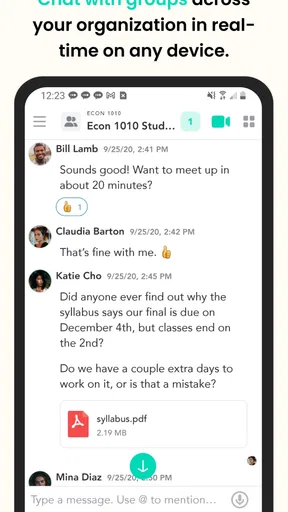
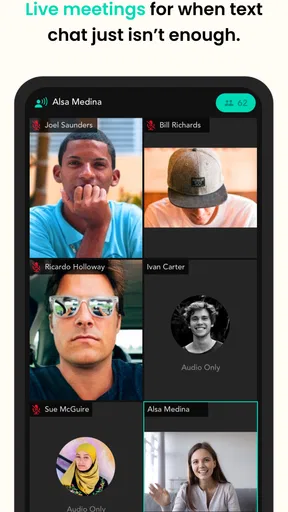
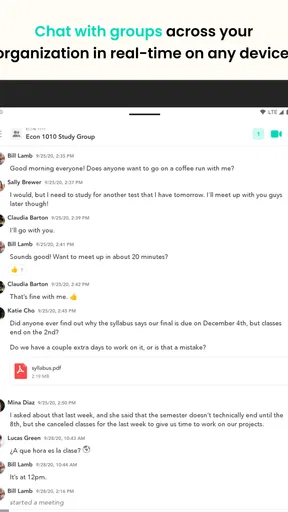
When I tried Pronto Team, the first thing that stood out was its narrow focus: bringing group texting and video chat into the same team conversation. That sounds simple, but it changes the rhythm of communication. Instead of splitting a quick decision between a group message and a separate video meeting, the app is designed around keeping those people together in one shared space.
I see it as a communication app for small teams, clubs, families, and informal groups that need more than one-to-one messaging but do not want the weight of a full workplace platform. It is free, aimed at everyone, and developed by Hitlabs. The app has been around since July 14, 2017, so it is not a brand-new experiment, and its current version is 7.0.7.
Its store summary describes the core idea as group text and video chat, while the short description identifies it as Pronto Team. That distinction matters: this is not trying to be a broad social network or a project-management suite. The useful question is whether combining group text with live video makes everyday coordination easier for you.
Why the combined conversation matters
Most messaging apps are comfortable for text, and many video services are comfortable for scheduled calls. The friction appears when a group moves back and forth between the two. Someone posts a question, another person answers with a long explanation, a third asks for a call, and suddenly the useful context is scattered across different places.
Pronto Team’s central capability addresses that handoff. A group can begin with written messages, move into video when the subject needs faces and voices, and return to text afterward. In my experience, the value is not simply having video available. The real benefit is keeping the conversation attached to the group that started it.
That makes the app more interesting for decisions than for casual chatting. A text thread is good for collecting short opinions or sharing a reminder. Video is better when tone, explanation, or quick back-and-forth matters. Having both modes close together can reduce the temptation to create a second conversation just because the first format stopped being efficient.
This capability also affects group size in a practical way. In a one-to-one chat, switching from text to video is easy in almost any communication tool. In a group, the switch is more valuable because every participant already knows where the discussion lives. Nobody has to wonder whether the latest answer is in a separate call, a different app, or an old message thread.
Worth Reading Before You Choose

EA SPORTS FC Mobile 26 Is a Bigger Football Game, but It Takes Time

Flipboard Shows What News Apps Must Do Beyond the Feed

Switching to Android Auto Means Rethinking Your Driving Routine

Google Calendar Makes a Crowded Week Easier to Manage

Ludo King Makes the Most of the Minutes Between Plans

Baby Panda World Brings Quick Play to Modern Phones, but Its Game Library Feels Busy
That does not make every group conversation better as a video call. Many discussions should stay written, especially when people are in different time zones or cannot respond immediately. The strength here is flexibility: the group can choose the format that fits the moment instead of treating every issue as either a message or a formal meeting.
What the text-to-video flow feels like
I would use the text side first for the setup. A useful opening message explains the subject, identifies the people who need to be involved, and makes it clear whether a live discussion is necessary. That small habit prevents the video portion from becoming a vague invitation with no shared context.
Once the topic becomes too detailed for short messages, the video option has a clear purpose. You are not starting from zero; the group has already seen the question. This is especially helpful when one person needs to demonstrate a problem verbally or when several people need to reach a decision without writing a long chain of replies.
After the call, I would return to text for the outcome. A short written conclusion is more useful than assuming everyone remembers the same details. The app’s combined design encourages this workflow, even though the quality of the result still depends on how disciplined the group is. The technology can keep the modes together, but people still need to summarize what was decided.
One non-obvious advantage is that this approach can make video less intimidating. A full video-meeting service often feels like an event: open a meeting, wait for participants, and manage a formal session. A group chat that can move into video feels more like an escalation of an existing conversation. For a small team that needs a quick answer, that difference can save mental effort.
There is also a trade-off in that informality. Because the conversation can shift quickly, participants may join a video discussion without enough preparation. My practical advice is to state the decision you need before switching modes. If the group cannot express the question in one or two sentences, the call may become unfocused.
A realistic everyday use case
Imagine a volunteer group preparing a community event. One member sends a text asking whether the welcome table should move indoors because the weather has changed. Several people reply with different suggestions. A short video conversation then lets the organizers look at the available space, explain who is bringing supplies, and settle the arrangement together.
The important part is not that video is more advanced than text. It is that the group does not need to rebuild its membership or repeat the original question somewhere else. Afterward, someone can post the final location and responsibilities in the same conversation. That creates a simple record for people who could not join live.
I can see the same pattern working for a family coordinating travel, a study group reviewing a difficult assignment, or a small remote team resolving a question that has become too nuanced for messages. In each case, the best result comes from using text for preparation and follow-up, with video reserved for the part that benefits from immediate interaction.
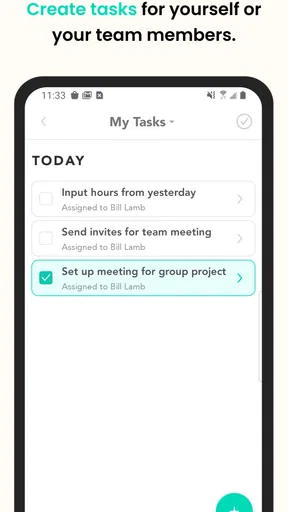
For a family, the app may be useful when several relatives need to agree on plans but do not want a formal meeting service. For students, it can help when a written explanation is going in circles and showing the problem aloud would be faster. For a small work group, it can provide a lighter alternative to a larger collaboration platform when the main need is conversation rather than task tracking.
Where it fits among familiar alternatives
The usual alternatives each have a different center of gravity. Standard group-messaging apps often make text effortless, but video may feel like a secondary function or may send the group into another service. Dedicated video platforms are usually stronger for structured meetings, yet they can feel excessive for a quick discussion that began as a message.
Pronto Team sits between those approaches. Its appeal is not that it replaces every messaging or meeting tool. Rather, it offers a focused route for groups that want the convenience of a message thread and the immediacy of video without making either mode the entire experience.
I would not choose it as a substitute for a project-management system. If your group needs assignments, deadlines, document organization, searchable work history, or detailed administration, a specialized workplace platform is likely a better fit. The app’s communication focus is an advantage only when communication is the main problem.
I also would not automatically move a large organization to it. Bigger groups often need more control over channels, roles, moderation, and records than a lightweight team conversation can provide. Pronto Team makes more sense when the people already know one another and the goal is quick coordination rather than building a complex information structure.
Compared with a normal group chat, the distinctive choice is the easier path into live conversation. Compared with a dedicated video service, the distinctive choice is continuity with the text discussion. That is a meaningful difference, but it is also a narrow one. If you rarely need video, a familiar messaging app may be simpler. If nearly every interaction is a scheduled meeting, a video-first service may feel more complete.
The friction I noticed in real use
The first limitation is behavioral rather than technical: groups can overuse video. A question that could be answered in two lines may turn into an interruption for everyone. I would set a clear expectation that video is for issues needing explanation or agreement, not for every minor update.
The second limitation is asynchronous communication. Text is naturally flexible, while video requires people to be available at the same time. That makes the combined model most effective for groups with overlapping schedules. If members are spread across very different routines, the text side may become the real center, and the video feature may be used only occasionally.
Another trade-off is attention. A group video discussion can be faster than a long message chain, but it demands more concentration from participants. Someone who is commuting, working in a noisy place, or handling another responsibility may prefer to contribute in writing. A considerate group should keep the text route open instead of treating live attendance as the only meaningful participation.
There is also a practical need for follow-up habits. A live conversation can solve the immediate issue while leaving no convenient summary for anyone who missed it. I recommend ending every useful call with a short text recap: the decision, the person responsible, and the next step. This is one of the strongest workflows for getting value from the app without turning it into a formal project tool.
Privacy and comfort are worth considering before inviting a broad audience. Because the app combines group messaging and video, users should be comfortable with who can participate in the conversation and when a live exchange is appropriate. For a close-knit group, that can be straightforward. For a public community or sensitive professional setting, I would compare its communication controls with the requirements of the group before making it the default.
The app’s public reception is reasonably positive but not overwhelming: it holds a 3.9 average from around 229 ratings and has about 64 written reviews. I read that as a sign of a useful but specialized product rather than a universal replacement for established communication tools. Its reach is also meaningful, with over 100 thousand installs, yet that scale does not remove the need to check whether its focused workflow matches your group.
Setup choices that make the experience better
My first recommendation is to create a simple group purpose before inviting everyone. A group named around a specific activity is easier to use than one that mixes unrelated subjects. This sounds obvious, but it directly affects whether the text-to-video transition feels organized or chaotic.
Second, agree on when a live conversation is justified. For example, use text for announcements, links, and quick votes, then move to video when the group needs explanation, negotiation, or a shared visual discussion. This prevents the most common failure of hybrid communication: using the most demanding format for the least demanding task.
Third, keep the post-call message short and concrete. I would avoid rewriting the entire conversation. A compact summary is enough to preserve the decision and help absent members catch up. This turns the same group thread into both a live space and a lightweight record.
A fourth useful habit is to ask for written input before a call when the topic affects several people. That gives quieter members a chance to state their view and makes the live portion more focused. It also reduces the risk that the fastest speaker controls the entire decision simply because video favors immediate responses.
These practices reveal the app’s real trade-off. It can reduce tool switching, but it does not automatically create good communication. The best experience comes from treating text and video as two deliberate stages of one conversation rather than as interchangeable buttons.
Who should choose Pronto Team?
I think the strongest audience is a small group that regularly moves between quick written coordination and occasional live discussion. That includes informal teams, families, clubs, volunteer organizers, and study groups. These users gain the most because they need a shared conversation more than they need a large set of collaboration features.
It is also a sensible option for someone who finds full meeting platforms too formal. If your group often says, “This is easier to explain live,” but does not want to schedule a conventional meeting, the app’s focused approach may fit naturally. The free price removes a major barrier for groups that want to try the workflow without committing to a subscription.
The everyone age rating makes it broadly approachable, although the suitability of any group conversation still depends on the people invited and the subjects discussed. Parents, organizers, and team leads should still establish sensible communication expectations instead of treating an age label as a substitute for judgment.
I would skip it if your priorities are advanced work management, extensive file organization, formal meeting controls, or a highly structured corporate communication system. I would also skip it if your group almost never uses video. In that case, a familiar text messenger may offer a cleaner experience with less to manage.
For me, the deciding question is simple: do your conversations regularly start in text and become easier when people can talk face to face? If the answer is yes, Pronto Team has a clear reason to exist. If the answer is no, its main capability may remain unused, and another communication app could be the more practical choice.
Hitlabs has kept the product centered on that specific bridge between group messages and video chat. With its current version, free access, communication category, and established presence since 2017, it is easy to test without treating the decision as a major investment. My recommendation is to try it with one real group rather than judging it from a single personal chat.
Use a genuine coordination problem as the test: plan an event, resolve a study question, or make a shared decision. Start in text, switch to video only when the discussion needs it, and finish with a written summary. If that sequence feels natural and reduces the usual jumping between apps, Pronto Team is worth keeping in your communication toolkit. If the group prefers either pure messaging or formal meetings, its focused design will probably feel unnecessary rather than helpful.
Pros
- Fast team messaging for quick updates and daily coordination.
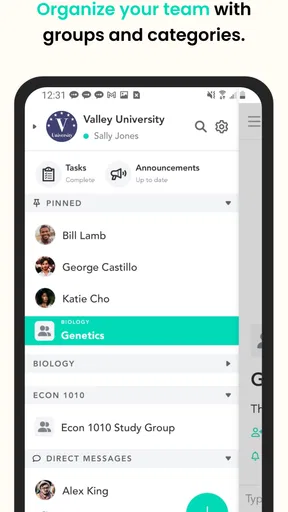
- Supports organized conversations for different teams or projects.
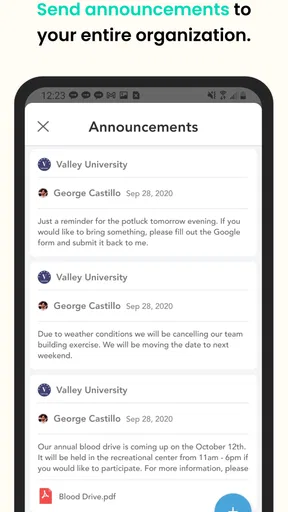
- Useful for sharing announcements and important workplace information.
- Can reduce reliance on long email threads and scattered chats.
- Designed to keep communication focused within a professional environment.
Cons
- Requires regular participation to prevent important messages being missed.
- Notification volume may become distracting in active teams.
- Less useful if coworkers do not consistently use the platform.
- Some features may depend on an organization’s account or setup.
- Not ideal for users seeking extensive personal social or entertainment features.
FAQs for Pronto Team Communication
What is Pronto Team Communication used for?
Pronto Team Communication is a workplace messaging and collaboration app designed to help teams exchange information quickly. It can support one-to-one chats, group conversations, file and media sharing, announcements, and communication between employees working in different locations. It is particularly useful for organizations that need a more focused alternative to personal messaging apps, although the exact tools available may depend on the company’s account and administrator settings.
Is Pronto Team Communication free to download and use?
The app may be available to download at no cost, but access is generally connected to an organization, team, or business account rather than being a completely open social messaging service. Some features and services can depend on the subscription or plan selected by the employer. Before installing it, users should confirm that their organization uses Pronto and check whether invitations, login credentials, or administrator approval are required.
Do I need an invitation or company account to log in?
In most workplace communication platforms, including Pronto Team Communication, users typically need an account created or authorized by their organization. You may be asked to enter a work email address, invitation code, username, or credentials provided by an administrator. If you download the app without an active team account, you might not be able to access chats or other features, so it is worth confirming the login process with your employer first.
Can Pronto Team Communication replace email and other messaging apps?
Pronto can make day-to-day team communication faster by keeping conversations, updates, and shared content in one workplace environment. However, whether it can replace email or another messaging tool depends on your organization’s workflow and the features enabled for your account. It may be well suited to quick discussions and team coordination, while formal documents, external contacts, calendar functions, or specialized project management tasks may still require additional services.
Is Pronto Team Communication secure and suitable for business conversations?
Pronto is intended for professional communication, but users should still follow their organization’s security and privacy policies. Avoid sharing sensitive passwords, confidential personal data, or information that should only be stored in approved systems. Security controls, data retention, administrator access, and privacy options can vary according to the organization’s configuration and the app’s current policies, so businesses should review those details before using it for sensitive discussions.


